
WordPress – Website Builder
4,3star
200K reviews

Rated for 12+
info
10M+
Downloads




About this app
WordPress for Android puts the power of web publishing in your pocket. It’s a website creator and so much more!
CREATE
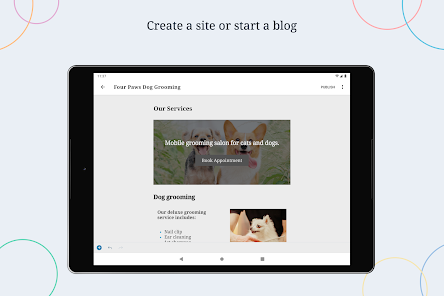
- Give your big ideas a home on the web. WordPress for Android is a website builder and a blog maker.
- Pick the right look and feel from a wide selection of WordPress themes, then customize with photos, colors, and fonts so it’s uniquely you.
- Built-in Quick Start tips guide you through the setup basics to set your new website up for success.
PUBLISH
- Create updates, stories, photo essays announcements -- anything! -- with the editor.
- Bring your posts and pages to life with photos and video from your camera and albums, or find the perfect image with the in-app collection of free-to-use pro photography.
- Save ideas as drafts and come back to them when your muse returns, or schedule new posts for the future so your site is always fresh and engaging.
- Add tags and categories to help new readers discover your posts, and watch your audience grow.
STATS
- Check your website’s stats in real time to keep track of the activity on your site.
- Track which posts and pages get the most traffic over time by exploring daily, weekly, monthly, and yearly insights.
NOTIFICATIONS
- Get notifications about comments, likes, and new followers so you can see people reacting to your website as it happens.
- Reply to new comments as they show up to keep the conversation flowing and acknowledge your readers.
READER
- Explore thousands of topics by tag, discover new authors and organizations, and follow the ones who pique your interest.
- Hang on to the posts that fascinate you with the Save for later feature.
SHARE
- Set up automated sharing to tell your followers on social media when you publish a new post.
- Add social sharing buttons to your posts so your visitors can share them with their network, and let your fans become your ambassadors.
Why WordPress?
There are a lot of blogging services, website builders, and social networks out there. Why create your website with WordPress?
WordPress powers over a third of the web. It’s used by hobby blogs, businesses of all sizes, online stores, even the biggest news sites on the internet. Odds are that many of your favorite websites are running on WordPress.
With WordPress, you own your own content. Other social networks treat you as a commodity, and assume ownership of the content you post. But with WordPress anything you publish is yours, and you can take it with you wherever you’d like.
Whether you need a website builder to create your website, or a simple blog maker, WordPress can help. It gives you beautiful designs, powerful features, and the freedom to build anything you want.
California users privacy notice: https://wp.me/Pe4R-d/#california-consumer-privacy-act-ccpa.
CREATE
- Give your big ideas a home on the web. WordPress for Android is a website builder and a blog maker.
- Pick the right look and feel from a wide selection of WordPress themes, then customize with photos, colors, and fonts so it’s uniquely you.
- Built-in Quick Start tips guide you through the setup basics to set your new website up for success.
PUBLISH
- Create updates, stories, photo essays announcements -- anything! -- with the editor.
- Bring your posts and pages to life with photos and video from your camera and albums, or find the perfect image with the in-app collection of free-to-use pro photography.
- Save ideas as drafts and come back to them when your muse returns, or schedule new posts for the future so your site is always fresh and engaging.
- Add tags and categories to help new readers discover your posts, and watch your audience grow.
STATS
- Check your website’s stats in real time to keep track of the activity on your site.
- Track which posts and pages get the most traffic over time by exploring daily, weekly, monthly, and yearly insights.
NOTIFICATIONS
- Get notifications about comments, likes, and new followers so you can see people reacting to your website as it happens.
- Reply to new comments as they show up to keep the conversation flowing and acknowledge your readers.
READER
- Explore thousands of topics by tag, discover new authors and organizations, and follow the ones who pique your interest.
- Hang on to the posts that fascinate you with the Save for later feature.
SHARE
- Set up automated sharing to tell your followers on social media when you publish a new post.
- Add social sharing buttons to your posts so your visitors can share them with their network, and let your fans become your ambassadors.
Why WordPress?
There are a lot of blogging services, website builders, and social networks out there. Why create your website with WordPress?
WordPress powers over a third of the web. It’s used by hobby blogs, businesses of all sizes, online stores, even the biggest news sites on the internet. Odds are that many of your favorite websites are running on WordPress.
With WordPress, you own your own content. Other social networks treat you as a commodity, and assume ownership of the content you post. But with WordPress anything you publish is yours, and you can take it with you wherever you’d like.
Whether you need a website builder to create your website, or a simple blog maker, WordPress can help. It gives you beautiful designs, powerful features, and the freedom to build anything you want.
California users privacy notice: https://wp.me/Pe4R-d/#california-consumer-privacy-act-ccpa.
Updated on
Safety starts with understanding how developers collect and share your data. Data privacy and security practices may vary based on your use, region and age. The developer provided this information and may update it over time.

No data shared with third parties
Learn more about how developers declare sharing

This app may collect these data types
Personal info, Messages and 7 others

Data isn’t encrypted

You can request that data be deleted
Ratings and reviews
4,3
190K reviews

Ben Perkins
- Flag inappropriate
29 June 2025
It's so freaking nice to have WordPress on my favorite computer, Android! 😎 That instant posting with the app widget thing is unbeatable (web interface, time to catch up). 🤩 Biggest issue for me so far: The media uploader changes the names of all the files I upload. I want my files to have specific slugs so I name them before uploading. But I noticed the names and slugs kept turning to gibberish. Then noticed the web uploader doesn't do this. I'm back to using the web until this is fixed.
173 people found this review helpful

A Google user
- Flag inappropriate
- Show review history
22 September 2018
The app kept crashing after I uploaded a draft with pictures. It wouldn't load every time I tried to edit a draft that contained pictures (it works for drafts that are all text). Even when I restart the app, it will crash whenever I tried to edit posts. Since I use the app to upload pictures easily, this app is now useless compared to the browser which can do the same things without crashing.
10 people found this review helpful
Automattic, Inc
28 September 2018
That's no good! We can look into this for you!. Can you please get in touch, go to ME (the icon of a person in the app's toolbar) then "Help & Support" and tap on "Contact us". Our support team will be happy to troubleshoot any issue with you.

James Zigrino
- Flag inappropriate
13 May 2025
It's very good within a very limited context; if you want to quickly throw up quick text drafts from your phone to polish from a PC later, it's great. Expect more and you'll be disappointed. However requiring XMLRPC is a big security hole - 2 urgent changes required: 1) support a manually entered modified XMLRPC URL or tag required ONLY during setup. Requiring link tag ongoing means you can't obscure the URL. 2) support for 2FA
112 people found this review helpful
What's new
- Button colors are now consistent across different areas of the app.
- We fixed an infinite loop that sometimes appeared when opening certain types of links.
- We fixed an infinite loop that sometimes appeared when opening certain types of links.
App support
About the developer
Automattic Inc.
android@automattic.com
60 29th St Ste 343
San Francisco, CA 94110
United States
+1 531-234-5675


