

Cloudflare is a DNS management service that works with Pressable. If you are using Cloudflare to manage your DNS, it is important to set up the SSL settings at Cloudflare to ensure it works with Pressable’s SSL. If you receive a “Getting Too Many Redirects” error, then this guide will help you resolve that issue.
There are two steps involved with setting this up: 1) Pressable’s SSL setup and 2) Cloudflare’s Crypto setup.
Pressable’s SSL Setup
By default when you add a domain to your site at Pressable, a Let’s Encrypt SSL certificate is automatically provisioned and setup. All sites are required to have an SSL certificate.
Cloudflare’s Crypto Setup
In your Cloudflare dashboard, there is a tab for “SSL/TLS.” This is where you determine how Cloudflare and Pressable handle SSL coordination. Click on the SSL/TLS tab:
On the next page, choose “Full” from the selection.
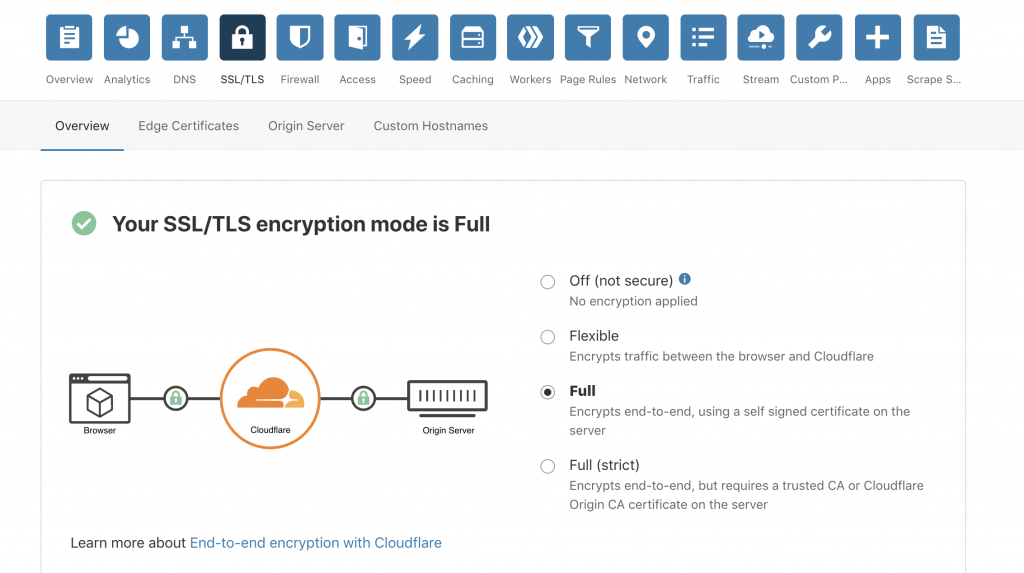
After you have set the option to Full, the SSL certificate will be set up to work between Pressable and Cloudflare.