

Hosting serves as the foundation of a website, affecting everything from security and performance to functionality and maintenance workflows. So, choosing a host isn’t a decision you should take lightly. But don’t worry — Pressable is here to help. While we are one of the two hosting companies in this comparison, our goal is to offer an honest, comprehensive overview of both Pressable and WP Engine so that you can make the best decision for your specific needs. After all, every provider is not right for every website, and it’s important that you consider all of the factors before making a decision.
Why Would You Switch Hosting Providers?
Before we compare Pressable to WP Engine, let’s take a look at a few reasons you might consider migrating to a new hosting provider:
- To implement different or more advanced functionality: Your hosting provider shouldn’t hold you back. So if you feel like you’re missing a specific functionality — like staging sites, dev environments, third-party integrations, or built-in performance tools — it’s time to review your options.
- To improve speed or security: Hosts can impact site performance and security on several levels, which we’ll explore in a bit. If your provider doesn’t offer the resources or tools you need for speed and security, you’ll want to upgrade.
- To access better customer support: Your website matters a lot to you — and it should matter to your host, too! If getting help with your hosting plan feels like repeatedly hitting a brick wall, you should find a provider with higher-quality support, available right when you need it.
- To gain more resources: Hosting providers typically allocate a certain amount of resources (storage, bandwidth, etc.) to sites based on the plan they’ve purchased. If you continually exceed these resources, you should think about finding a provider that can better support your website.
- To scale more effectively: As you grow, your host should be able to accommodate your needs without sacrificing speed or security. This may mean allocating more resources, providing more advanced tools, or automatically scaling your plan to avoid downtime.
- To switch pricing models: Perhaps you feel nickel and dimed by your current hosting provider, with up-charges for every little thing. Maybe you would rather pay based on the resources your site actually uses. Or maybe you’d rather pay annually instead of monthly. No matter which scenario describes your business, it could be time to switch to a new host.
Now that we’ve explored some reasons you may want to switch hosts, let’s get to know the two providers we’re comparing today.
An Overview of Pressable
Pressable is a fully-managed WordPress host, backed by Automattic — the people behind WordPress.com, WooCommerce, and Jetpack. So for those building their site with WordPress, it’s hard to find a host with more WordPress-specific expertise than the team at Pressable.
They offer plans for sites that want reliable, top-quality features, serving new small businesses to mission-critical enterprise operations and agencies. Pressable caters to those looking for premium customer service and the most reliable infrastructure.
Pressable plans are straightforward, with no hidden fees, and include powerful features that help WordPress sites load quickly, stay secure, and scale to any size. They allow for extensive flexibility and customization for knowledgeable developers, while providing a done-for-you, stress-free experience for new site owners who don’t have time to haggle over technical details.
Whatever you’re building, if you’re looking for a truly reliable hosting partner that will respond within minutes, Pressable is an ideal WP Engine alternative.
An Overview of WP Engine
WP Engine is a managed WordPress hosting provider, with plans tailored to small businesses, agencies, online stores, and developers. They offer WordPress-specific features designed to help site owners maximize their time and grow along the way. WP Engine is also behind WordPress tools like Local.
Over the years, they’ve made investments in various WordPress-related tools like NitroPack for WordPress performance, as well as a number of plugin and theme developers.
Pressable vs. WP Engine Comparison Table
Want the TL;DR version? Take a look at some key differences between Pressable and WP Engine entry-level plans.
| Pressable | WP Engine | |
|---|---|---|
| Starting Price | $20.83/month billed annually | $25/month billed annually |
| Bandwidth Limits | Unlimited | 75 GB |
| Storage | 20GB | 10GB |
| Uptime | 100% uptime guaranteed | 99.99% uptime guaranteed |
| User Visit Limits | 30k visits | 25k visits |
| Performance |
Global Edge Cache Auto-scaling Performance reports |
Cloudflare integration Caching |
| Platform | WP Cloud | Google, AWS, Azure |
| Backups | Daily and hourly automated, plus real time through Jetpack | Daily automated |
| Site Monitoring | Included | $5/month |
| Auto-scaling | Yes, included on all plans | Cloudflare $30/month upsell on some plans, included on others |
| Managed Plugin Updates | With Plugin Update Scheduler ($3+/month) with automated rollbacks | With Smart Plugin Manager ($3+/month) with visual regression testing |
| Multisite Support | Subdomain and subdirectory support on high-traffic plans or signature 5+ plans | $30/month add-on for lower plans, free for $400+ |
| Customer Support |
24/7 live chat support with true WordPress experts Premium Slack support available |
24/7 chat-only support Additional support on higher-tier plans |
| Ease of Migration | White glove service and self-service plugin option. | Self-service plugin |
Hosting Package Options
Hosting packages refer to the different plans available with each provider — the resources and features included, along with the price for each one. Consider the plan that’s right for you at the moment, as well as the options available as you grow.
Base Pricing and Included Resources
The resources included with your plan have a direct impact on the performance and functionality of your site.
Let’s say that you run an ecommerce store and are offering a big Black Friday sale. If you get a ton of traffic at once and exceed your allotted resources unexpectedly, your site could load very slowly or even crash. And you don’t want to miss out on all those sales you earned!
Here are the differences between Pressable vs. WP Engine when it comes to resources:
- Pressable starter plans include 20GB of storage, while WP Engine’s include 10GB
- Pressable plans include unlimited bandwidth, while WP Engine’s start at 75 GB and vary based on individual plans
- Pressable starter plans limit sites to 30k visits, while WP Engine’s support 25K visits
Pressable and WP Engine have very similar pricing:
- Pressable plans start at $20.83 per month billed annually
- WP Engine’s are $25 per month billed annually
- Pressable agency plans start at $292 per month billed annually
- WP Engine’s agency plans start at $400 per month billed annually
Add-on Costs
Pressable plans are packed with value, with straightforward options that don’t require a tech wizard to understand. You won’t be hit with hidden costs for features that should be included by default.
For example, each plan comes with staging environments, unlimited migrations, automatic plugin updates, malware monitoring, Jetpack Security, a CDN, a web application firewall (WAF), and more.
WP Engine, has several add-ons available at an additional cost. These include, but aren’t limited to ecommerce tools for your online store, automated plugin updates, extra security features, page speed optimization, etc.
Pressable includes multi-site support in five-site plans and up. WP Engine charges $30 per month for lower-tier plans and only includes multi-site support for $400 and up offerings.
Hosting Features
While both providers offer some similar features, there are some clear differences.
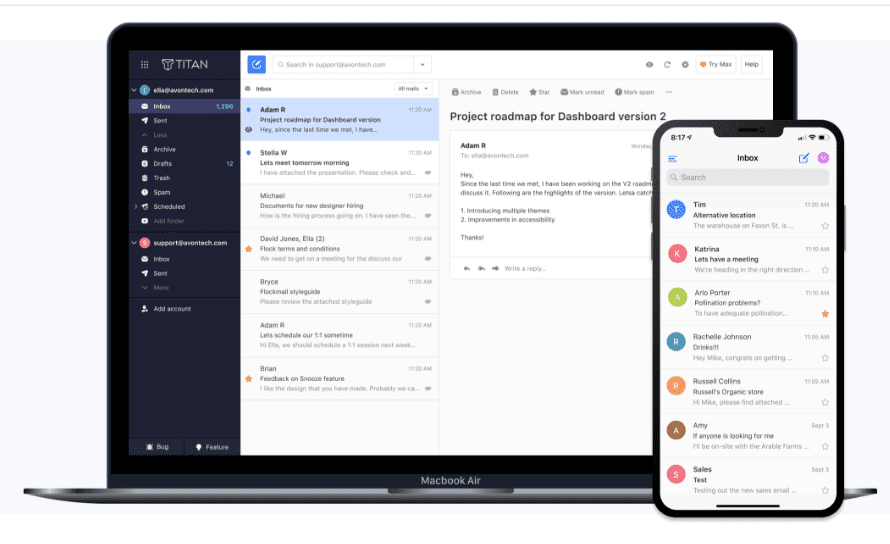
Email accounts are simply not available through WP Engine, though they’re an important tool for any business. Pressable, however, offers email hosting with Titan Email for a small fee of $3.50 per month.
Jetpack Security is another huge win for Pressable. Included with each plan, (a $239/year value!) it adds real-time backups, malware scans, an activity log, spam protection, brute force attack protection, downtime monitoring, and more.
WP Engine has a few unique features, too. For example, their local development tool (called Local), integrates with their hosting plans to streamline the dev workflow. If you’re a small business owner, this means that your developer or agency can build and test more effectively.
Also note that Pressable includes one staging site, while WP Engine includes both a staging site and a development site.
Protecting Your Site and Customer Data
We all know that a hacked site is no fun. A single bad actor could cause downtime, reduced performance, compromised customer data, lost files, and a damaged reputation.
Just like with performance, security starts with your host. Both providers include SSL certificates with all of their plans, along with hack resolution and backups.
Pressable plans include a web application firewall (WAF) that acts as a barrier between traffic and your website, weeding out any bad actors. This protects against a wide variety of threats, from cross-site scripting to SQL injection. Customers also benefit from automatic WordPress core, plugin, and theme updates, along with vulnerability and malware scans.
While WP Engine does offer basic security features, if you want anything robust like a managed WAF and advanced DDoS mitigation, you’re going to need one of their more expensive plans. Want automatic plugin updates? That’ll be another $3 per month.
One of the most notable benefits of Pressable is that it includes Jetpack Security, which chock full of valuable features, including:
- Real-time backups: Your website is backed up every single time an action takes place, from an updated plugin or edited page to a placed order. Backups are stored completely separately from your server, so you can access them even if your site is down, and restorations only take a few clicks.
- Spam protection: Prevent harmful and reputation-damaging spam from invading your registration, comment, and contact forms.
- An activity log: See everything that happens on your site, along with who took each action and when it occurred. You can even restore a backup from right before an action took place.
- A web application firewall: Add a rock-solid layer of protection between potentially malicious traffic and your website.
- Real-time malware scans: This feature is like having a security camera observing your site 24/7. If there’s ever a problem, you’ll know immediately so you can take action. You can solve the majority of problems with one click.
As you can see, especially with the added benefits of Jetpack Security, Pressable includes far more security features in their plans by default. WP Engine, however, charges extra for many of them.in their plans by default. WP Engine, however, charges extra for many of them.
WooCommerce Support
If you run an online store, you’ll need a host that can support your unique needs, and both WP Engine and Pressable can do so.
A lot of hosts include the exact same features in their ecommerce plans as they do any other, but you shouldn’t have to pay more for marketing! But Pressable plans are automatically packed full of features that benefit WooCommerce stores.
Many of Pressable’s features that we’ve already discussed are perfect for a Woo store. Real-time backups with Jetpack Security? Perfect for stores that never want to lose an order. Auto-scaling? Great for Black Friday and other times of high traffic. Global CDN and caching? Excellent for stores catering to an international audience.
Plus, since Pressable is owned by Automattic, you know that the support team understands WooCommerce better than anyone else around. And you can install WooCommerce with a single click when you set up your account.
So what about WP Engine? You can add an ecommerce package to any plan for an extra fee. This includes features like WooCommerce-specific performance optimizations, one-click store creation, and a Stripe Connect hosted checkout.
With Professional plans, you’ll get access to their Instant Store Search tool, which is an advanced, highly-customizable search functionality. Again, other features we’ve already discussed also come in handy for ecommerce stores, like WP Engine’s global CDN.
Developer Friendliness
Want to make your developer happy? Think about how developer-friendly a host is before choosing to work with one. And if you are a developer, well, this is probably already top-of-mind for you.
Ease of Making Advanced Modifications
Pressable offers a number of tools that simplify the developer workflow, while allowing for advanced modifications. These include:
- A simple, but robust, API application process
- A GitHub integration that streamlines site deployment
- SSH and WP-CLI connections
- Automated workflows
- Staging environments that allow you to create, deploy, and test with just a few clicks
- Super fast WordPress provisioning
- Automated plugin updates and schedules

Plus, the entire dashboard is straightforward, so you can check tasks off your list quickly.
WP Engine also offers some great tools for developers. If you’re already working with Local, you can deploy websites seamlessly to your live environment.
There are also features like:
- A GitHub integration
- Automated plugin updates and schedules
- Code-level application performance monitoring for faster troubleshooting
- An internal API for connecting third-party applications
The WP Engine dashboard is similarly straightforward, with access to important functionality for developers.
Client/Developer Access and Permissions
Whether you’re the hosting account manager looking to give access to your developer, or a developer hosting a site on behalf of a client, you don’t want to jump through hurdles when it comes to access. Everyone should be able to complete their work efficiently and securely.
Pressable has a Collaborators tab in your hosting dashboard, where you can quickly create new accounts. You set an email address, choose the sites they’ll be able to access, then select the permissions they have on the account. Those permissions are very granular, with more than 20 unique capabilities you can assign.
While the WP Engine user creation process is also simple, you don’t have nearly the type of granular access controls that you do with Pressable. Instead, you choose from a handful of roles with pre-assigned permissions.
Support for Agencies and Multiple Websites
There’s never enough time in a day when you manage or work at an agency! There’s always a site to build, plugins to update, and fires to put out. So what if your host actually supported your workflows and streamlined day-to-day operations while offering services that you can rely on?
Pressable and WP Engine both offer agency features and support.
When you host a client site on Pressable, you can provide them with truly reliable service. Features like 100% uptime, auto-scaling, automatic failover, a global CDN, and powerful security tools mean that you won’t have to worry so much about performance, downtime, and hacks. And if you offer maintenance plans, you can tout these tools as features they benefit from when working with your team.
Speaking of teams, Pressable is built to make managing all the moving parts involved with running an agency is easier. Create hyper-customized collaborator roles, so all of your team members and clients have exactly the type of access they need. Use staging environments for testing and developing, and quickly deploy from staging or GitHub.
You’ll also get access to a straightforward, robust dashboard, where you can manage client sites in bulk, create custom plugin update schedules, and more.

This goes beyond just automatic updates — Pressable performs automated backups, cloning to staging environments, deploying updates, and testing for errors so you don’t have to.
And those middle-of-the-night client emergencies? Pressable support is awake and available to help.
Plus, if you’re an Automattic for Agencies partner, you get access to additional premium Jetpack tools — like instant search, video hosting, a powerful CRM, social media auto-scheduling, and more. The program also provides revenue sharing opportunities when recommending clients the proven Automattic tools you already love, along with more advanced multi-site management and client billing tools.
WP Engine also has a suite of features specific to agencies. If Local is a part of your everyday workflow, you can quickly deploy to staging and live environments with WP Engine. If you offer maintenance plans for your clients, you can take advantage of the Smart Plugin Manager add-on, which deploys scheduled updates and tests for any issues.
And, of course, your clients will get access to the other features and benefits discussed above, like performance optimization, security tools, and Stripe Connect for ecommerce stores.
WP Engine also offers an agency partner program, with priority support, referrals, commissions, and volume discounts.
Customer Support and Assistance
Customer support is important, whether you run a blog, online store, enterprise business, or agency. If you’re trying to figure something out or run into a problem, you need someone to be able to help you, at any time of the day or night.
Pressable and WP Engine both offer 24/7 support to their customers via live chat. WP Engine customers on the Professional plan and up can also call a support number if they need help. For an additional fee, Pressable customers can have a private Slack support channel that offers priority help.
Both companies have extensive documentation, eBooks, and other resources to help site owners along the way.
One big plus for Pressable is that they’re owned by Automattic, the people behind WordPress.com and WooCommerce. Their support team is made up of true WordPress experts who work hard to exceed your expectations in every interaction with phenomenal customer service.
Ease of Migration
If you’re currently using another provider, ease of migration is going to be a big factor to consider. The process should be seamless and shouldn’t disrupt your website.
Pressable includes a white-glove migration service with all plans that handles the entire process on your behalf. If you do want to handle things yourself for more granular control, there’s also a simple self-service plugin available.
While WP Engine has a self-service plugin, they do not currently offer migration services. However, they do have seamless integration with Local, for those who want to develop locally. Rather than having to use a plugin to push from a dev to live environment, users can automatically migrate to their live server.
The Ideal Customer
Based on our findings, WP Engine is a good fit for developers and advanced users who find peace of mind with big box providers who have enterprise-level investor backing. If you’re already working with Local, WP Engine could be a good choice to meet your existing workflow.
Pressable is the ideal choice for:
- Experienced WordPress developers: For freelancers and agency leads who are responsible for building intricate, high-performance websites to meet demanding client needs, Pressable provides the resources and customization options you’re looking for. Automated WordPress core updates, staging environments with Git integration, WP-CLI and SSH access, and 24/7 senior-level WordPress support are all features you’ll enjoy.
- Business owners: For entrepreneurs who need secure, reliable hosting with guaranteed uptime and a user-friendly platform, Pressable makes the ideal partner with scalable hosting plans and responsive customer support.
- Ecommerce stores: For growth-focused online stores that need to maximize conversion rates and provide a smooth, user-friendly shopping experience, Pressable provides WooCommerce-optimized hosting specifically for stores. Features like built-in caching, auto-scaling, automatic failover, and integration with popular payment gateways helps your store grow efficiently.
- Agencies: For agencies who need to stand apart from a vast pool of competitors and maximize every opportunity, Pressable provides a reliable hosting tool for client sites, with 100% uptime, auto-scaling, automatic failover, and security and speed tools. Speed up your workflow thanks to automatic plugin update schedules, advanced collaborator permissions, and always-available WordPress expert support.
- IT leaders at enterprise organizations: Pressable offers hosting solutions that seamlessly scale to handle massive traffic volumes and that adhere to strict industry regulations and data privacy compliance standards (PCI-DSS, GDPR). Pressable further serves experienced IT directors by providing custom WordPress solutions, compliance certifications, and dedicated account managers with direct access to senior-level WordPress and cloud hosting specialists.
Enjoy Best-in-Class WordPress Hosting with Pressable
So, as you can see, both Pressable and WP Engine offer WordPress-focused features and tools that are designed to help sites of any size succeed.
At the end of the day, Pressable packs a wealth of features into simple, easy-to-manage plans with straightforward pricing. If you’re just starting out, you can dive right in and enjoy unrivaled support from true WordPress experts. As you grow your small business, your hosting plan will grow with you, even automatically adjusting to handle traffic spikes without throttling your website or charging additional fees.
And if you run an agency or manage multiple WordPress sites, then Pressable will come alongside you, providing tools that simplify your workflow, delight your clients, and help you earn more revenue while saving you time.
Imagine a hosting provider that truly works for you, with support ready to help you handle any challenges you run into.
Ready to get started? See how easy it is to host with Pressable!
Footnote: The data on this page is accurate as of 1/21/2025 for both Pressable and WP Engine.