In this Microsoft Fabric series:
- Dec 01: What is Microsoft Fabric?
- Dec 02: Getting started with Microsoft Fabric
- Dec 03: What is lakehouse in Fabric?
- Dec 04: Delta lake and delta tables in Microsoft Fabric
- Dec 05: Getting data into lakehouse
- Dec 06: SQL Analytics endpoint
Let’s explore the SQL commands that are available in SQL Analytics endpoint. And it should be easier to check, what is currently not supported and should also be dependant on the license plan.
In addition, I would like to emphasise, that Fabric Warehouse and Fabric SQL Analytics endpoints are not the same services, hence commands that will work in Warehouse, might not work in SQL Analytics!
What is not supported
CREATE TABLE can fail:
CREATE table Advent2023.dbo.test (
ID INT NOT NULL
,SomeTExt VARCHAR(100) NOT NULL
)
You will need to create a delta table in Lakehouse workspace (using e.g.: notebooks and SparkSQL). On the other hand, create a view or creating a view with schemabinding is not a problem:
DROP VIEW IF EXISTS dbo.testView_sb
CREATE VIEW  dbo.testView_sb
WITH SCHEMABINDING
AS
SELECT
[Petal.Length], [Species]
from dbo.iris_data
The famous CTAS – CREATE TABLE AS SELECT, will also not work in SQL Analytics. These will for sure work in Fabric warehouse to save on copying and moving data.
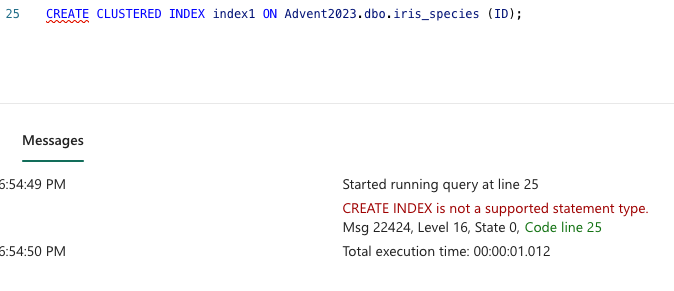
Creating index/ indexes is also not supported and will be terminated:
CREATE CLUSTERED INDEX index1 ON Advent2023.dbo.iris_species (ID);
Synonyms are also not supported:
CREATE SYNONYM iris_rozice
FOR Advent2023.dbo.iris_data;
Also not supported is CREATE RULE / DEFAULT. In addition, you will not be able to TRUNCATE the table

You get the gist, and there are some other limitations; computed columns, indexed views, any kind of indexes, partitioned tables, triggers, user-defined types, sparse columns, surrogate keys, temporary tables and many more. Essentially, all the commands that are not supported in distributed processing mode.
The most biggest annoyance (!) is case sensitivity! Ughh.. This proves that the SQL operates like API on top of delta tables, which is translated either into PySpark commands or not directly to Spark since Spark is not case-sensitive. So, the first one will work and the second statement will be gracefully terminated.
SELECT * FROM dbo.iris_data;
SELECT * FROM dbo.Iris_Data;

Functions for using different data types are supported, but there are some, like image, text. But the majority will work. And here is the mapping between the delta table format and T-SQL

(source: https://learn.microsoft.com/en-us/fabric/data-warehouse/data-types)
As well any DML statements are not supported, mainly DELETE, INSERT, UPDATE and others. Also, ALTER table (but ALTER on function, procedure will work!), column will not work! So keep in mind that DML statements will have to be done on the delta table level! Both super simple queries will be terminated since the DML statements are not supported (allowed):
DELETE FROM iris_species WHERE ID =1

UPDATE dbo.iris_species
SET species = 'Setosa'
where ID=1
Creating procedures will also work, as well as the functions. With functions, table-valued and will work just fine:
CREATE FUNCTION udfSpecies (
    @id INT
)
RETURNS TABLE
AS
RETURN
    SELECT
        ID
        ,species
    FROM
        iris_species
    WHERE
        ID = @id;


SELECT * FROM udfSpecies(1)
What about Multi-statement table-valued functions (MSTVF)? This one will unfortunately not work, because the @return_variable is not supported for CREATE/ALTER FUNCTION.
CREATE FUNCTION udmfSpecies()
    RETURNS @data TABLE (
        sl VARCHAR(50),
        sw VARCHAR(50),
        pl VARCHAR(50),
        pw VARCHAR(50),
        species VARCHAR(50)
    )
AS
BEGIN
    INSERT INTO @data
    SELECT
     [Sepal.Length]
     ,[Sepal.Width]
     ,[Petal.Length]
     ,[Petal.Width]
     ,[Species]
    FROM
        [dbo].[iris_data];
    RETURN;
END;


SELECT * FROM udmfSpecies
To sum it up; SQL analytics brings so many great features and capabilities to construct and write queries. DML and transactional statements are not supported, since this workspace is meant for analytics. Also optimisation and performance statements would be covered one layer below on the delta lake level and distributed processing mode.
Tomorrow we will look into Lakehouse REST API.
Complete set of code, documents, notebooks, and all of the materials will be available at the Github repository: https://github.com/tomaztk/Microsoft-Fabric
Happy Advent of 2023! 🙂


 TomazTsql
[…] Dec 07: SQL commands in SQL Analytics endpoint […]
LikeLike
[…] Dec 07: SQL commands in SQL Analytics endpoint […]
LikeLike
[…] Dec 07: SQL commands in SQL Analytics endpoint […]
LikeLike
[…] Dec 07: SQL commands in SQL Analytics endpoint […]
LikeLike
[…] Dec 07: SQL commands in SQL Analytics endpoint […]
LikeLike
[…] Dec 07: SQL commands in SQL Analytics endpoint […]
LikeLike
[…] Dec 07: SQL commands in SQL Analytics endpoint […]
LikeLike
[…] Dec 07: SQL commands in SQL Analytics endpoint […]
LikeLike
[…] Dec 07: SQL commands in SQL Analytics endpoint […]
LikeLike
[…] Dec 07: SQL commands in SQL Analytics endpoint […]
LikeLike
[…] Dec 07: SQL commands in SQL Analytics endpoint […]
LikeLike
[…] Dec 07: SQL commands in SQL Analytics endpoint […]
LikeLike
[…] Dec 07: SQL commands in SQL Analytics endpoint […]
LikeLike
[…] Dec 07: SQL commands in SQL Analytics endpoint […]
LikeLike
[…] Dec 07: SQL commands in SQL Analytics endpoint […]
LikeLike
[…] Dec 07: SQL commands in SQL Analytics endpoint […]
LikeLike
[…] Dec 07: SQL commands in SQL Analytics endpoint […]
LikeLike
[…] Dec 07: SQL commands in SQL Analytics endpoint […]
LikeLike