In this Microsoft SQL Server 2025 series:
- Dec 01: Microsoft SQL Server 2025 – Introduction and installation
- Dec 02: Microsoft SQL Server 2025 – New T-SQL functions – native JSON data type and some functions
- Dec 03: Microsoft SQL Server 2025 – New T-SQL functions – JSON Index
- Dec 04: Microsoft SQL Server 2025 – New T-SQL functions – Product()
- Dec 05: Microsoft SQL Server 2025 – New T-SQL functions – BASE64_ENCODE() and BASE64_DECODE()
- Dec 06: Microsoft SQL Server 2025 – New T-SQL functions – REGEXP_LIKE()
- Dec 07: Microsoft SQL Server 2025 – New T-SQL functions – REGEXP_SUBSTR() and REGEXP_REPLACE()
- Dec 08: Microsoft SQL Server 2025 – New T-SQL functions – REGEXP_INSTR() and REGEXP_COUNT()
- Dec 09: Microsoft SQL Server 2025 – New T-SQL functions – REGEXP_MATCHES() and REGEXP_SPLIT_TO_TABLE()
- Dec 10: Microsoft SQL Server 2025 – External REST endpoint invocation
- Dec 11: Microsoft SQL Server 2025 – External REST endpoint invocation using LLM
- Dec 12: Microsoft SQL Server 2025 – New vector data type and Vector functions
- Dec 13: Microsoft SQL Server 2025 – Vector functions
- Dec 14: Microsoft SQL Server 2025 – Vector arrays or embeddings with function AI_GENERATE_EMBEDDINGS
- Dec 15: Microsoft SQL Server 2025 – T-SQL functions for AI External_Models, Chunks and Embeddings
- Dec 16: Microsoft SQL Server 2025 – Optional parameter plan optimization (OPPO)
- Dec 17: Microsoft SQL Server 2025 – Query hint ABORT_QUERY_EXECUTION
Optimized locking is a new feature in SQL Server 2025. It helps to reduce lock memory as very few locks are held even for large transactions. In addition, optimized locking avoids lock escalations and can avoid certain types of deadlocks. This allows more concurrent access to the table.
Optimized locking is composed of two primary components:
– transaction ID (TID) locking and
– lock after qualification (LAQ).
The logic behind is that
- Without optimized locking, updating 1,000 rows in a table might require 1,000 exclusive (
X) row locks held until the end of the transaction. - With optimized locking, updating 1,000 rows in a table might require 1,000
Xrow locks but each lock is released as soon as each row is updated, and only oneXTID lock is held until the end of the transaction. Because locks are released quickly, lock memory usage is reduced and lock escalation is much less likely to occur, improving workload concurrency.
Check for optimized locking
First we need to check if the optimized locking is set to on:
CREATE DATABASE db_18_OptimizedLocking;
GO

USE db_18_OptimizedLocking;
GO

SELECT database_id,
       name,
       is_accelerated_database_recovery_on,
       is_read_committed_snapshot_on,
       is_optimized_locking_on
FROM sys.databases
WHERE name = DB_NAME();
And it is turned off! It si enabled per database and is it by default disabled!

Let’s prepare the sample data:
DROP TABLE IF EXISTS dbo.TestTable
GO
CREATE TABLE dbo.TestTable
(
ID INT NOT NULL,
Val INT
);

INSERT INTO dbo.TestTable (ID, Val)
VALUES (1,10),(2,20),(3,30);
GO

SELECT * FROM dbo.TestTable
GO
Test without optimized locking
We will open three NEW queries and in each new file, we will copy / paste two concurrent update statements, the first will change the row with the ID = 1 (session 1) and the second one tries to change the row with the ID = 2 (session 2). In the last one (right pane – session 3) we placed the statement to show you the locks.
The second statement is blocked, because it can not acquire the necessary Update Lock which is needed to update the row:
-- file 1 (Session 1)
USE db_18_OptimizedLocking;
go

BEGIN transaction
UPDATE TestTable
SET val = val + 10
where id = 1

-- COMMIT TRANSACTION
ROLLBACK;
GO


-- file 2 (Session 2)
USE db_18_OptimizedLocking;
go

begin transaction
update TestTable
SET  val = val + 30
WHERE id = 2

-- COMMIT TRANSACTION
ROLLBACK
GO


-- file 3 (Session 3)
select
    resource_type,
    resource_database_id,
    resource_associated_entity_id,
   -- resource_description,
    request_mode,
    request_session_id,
    request_status

 from sys.dm_tran_locks;
GO
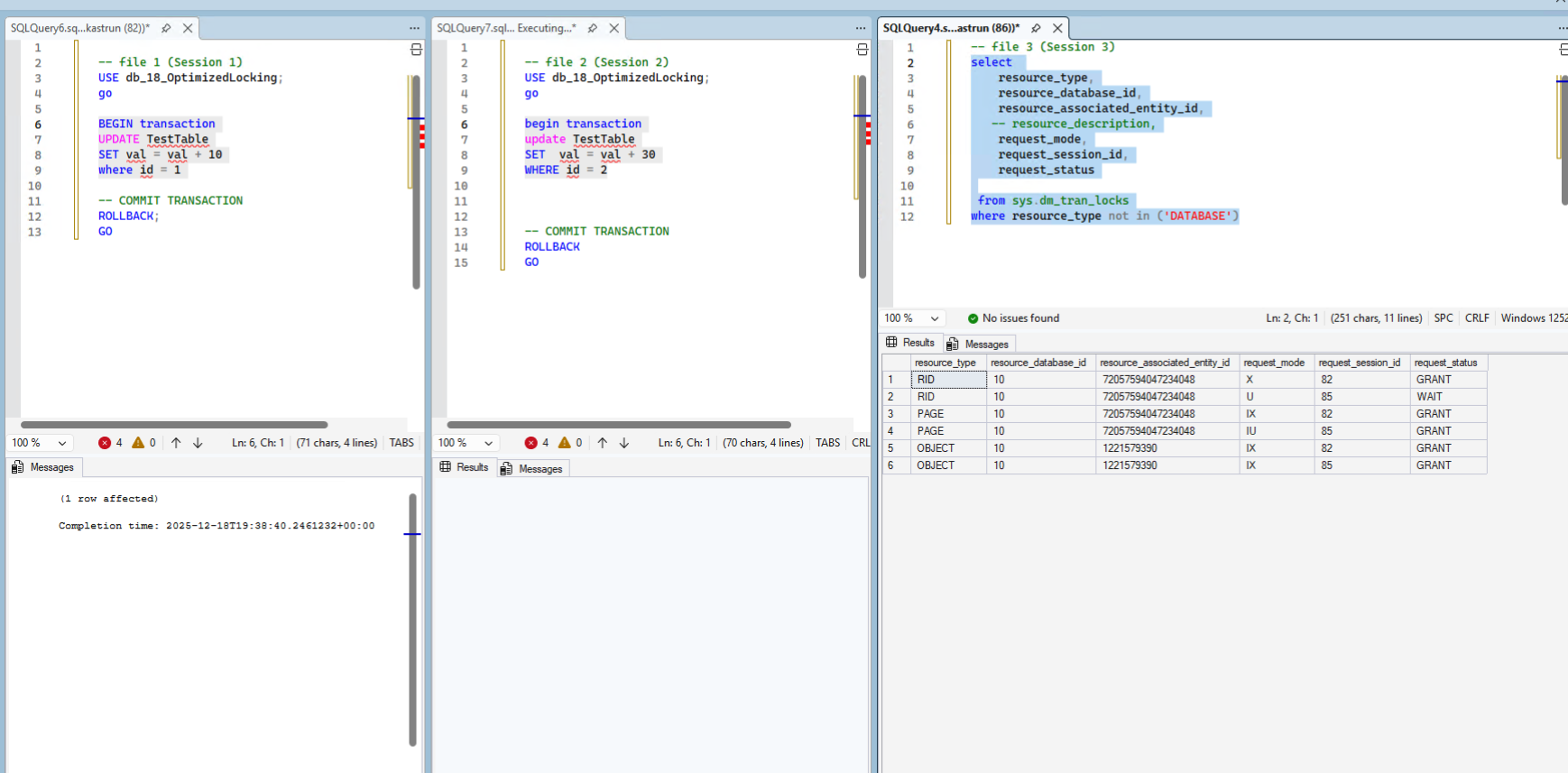
We see the lock

Test with optimized locking on (ADR on and RSCI off)
Now we will enable the optimized locking by enabling ADR before hand.
USE [master]
GO
ALTER DATABASE [db_18_OptimizedLocking] SET ACCELERATED_DATABASE_RECOVERY = ON;
GO
ALTER DATABASE [db_18_OptimizedLocking] SET OPTIMIZED_LOCKING = ON;
GO

SELECT DATABASEPROPERTYEX(DB_NAME(), 'IsOptimizedLockingOn') AS IsOptimizedLockingOn
GO
We get the enabled everything except RSCI (which is off).

And we will repeat the same test again:

And we see the new resource type of request mode = X was granted

TEst with optimized locking on
Test with optimized locking on (ADR on and RSCI on!)
We will turn on the RSCI:
ALTER DATABASE [db_18_OptimizedLocking]
SET READ_COMMITTED_SNAPSHOT ON;
GO
With all the features turned on:

And with the READ COMMITTED SNAPSHOT ON we get the resource type XACT with the request mode = X, which is update immediatelly and ready for new updates, without any locks (both updates are executed)

and for both updates we get granted transaction lock (resource_type = XACT and request_mode = X):

When Optimized Locking is enabled, the query in session 2 is not blocked because update (U) locks are not acquired. Thanks to the Transactions ID (TID) and Lock After Qualifications (LAQ), Optimized locking reduces the memory consumption and reduced locks between concurrent transactions.
Tomorrow we will look into the new CURRENT_DATE in SQL Server 2025.
As always, the code is available at my Github: https://github.com/tomaztk/SQLServer2025
Happy coding!


 TomazTsql
[…] Tomaz Kastrun continues an advent of SQL Server 2025: […]
LikeLike
[…] Dec 18: Microsoft SQL Server 2025 – Optimized locking […]
LikeLike
[…] Dec 18: Microsoft SQL Server 2025 – Optimized locking […]
LikeLike
[…] Dec 18: Microsoft SQL Server 2025 – Optimized locking […]
LikeLike
[…] Dec 18: Microsoft SQL Server 2025 – Optimized locking […]
LikeLike
[…] Dec 18: Microsoft SQL Server 2025 – Optimized locking […]
LikeLike
[…] Dec 18: Microsoft SQL Server 2025 – Optimized locking […]
LikeLike