In this Microsoft SQL Server 2025 series:
- Dec 01: Microsoft SQL Server 2025 – Introduction and installation
- Dec 02: Microsoft SQL Server 2025 – New T-SQL functions – native JSON data type and some functions
- Dec 03: Microsoft SQL Server 2025 – New T-SQL functions – JSON Index
- Dec 04: Microsoft SQL Server 2025 – New T-SQL functions – Product()
- Dec 05: Microsoft SQL Server 2025 – New T-SQL functions – BASE64_ENCODE() and BASE64_DECODE()
- Dec 06: Microsoft SQL Server 2025 – New T-SQL functions – REGEXP_LIKE()
- Dec 07: Microsoft SQL Server 2025 – New T-SQL functions – REGEXP_SUBSTR() and REGEXP_REPLACE()
- Dec 08: Microsoft SQL Server 2025 – New T-SQL functions – REGEXP_INSTR() and REGEXP_COUNT()
- Dec 09: Microsoft SQL Server 2025 – New T-SQL functions – REGEXP_MATCHES() and REGEXP_SPLIT_TO_TABLE()
- Dec 10: Microsoft SQL Server 2025 – External REST endpoint invocation
- Dec 11: Microsoft SQL Server 2025 – External REST endpoint invocation using LLM
- Dec 12: Microsoft SQL Server 2025 – New vector data type and Vector functions
- Dec 13: Microsoft SQL Server 2025 – Vector functions
- Dec 14: Microsoft SQL Server 2025 – Vector arrays or embeddings with function AI_GENERATE_EMBEDDINGS
- Dec 15: Microsoft SQL Server 2025 – T-SQL functions for AI External_Models, Chunks and Embeddings
- Dec 16: Microsoft SQL Server 2025 – Optional parameter plan optimization (OPPO)
- Dec 17: Microsoft SQL Server 2025 – Query hint ABORT_QUERY_EXECUTION
- Dec 18: Microsoft SQL Server 2025 – Optimized locking
- Dec 19: Microsoft SQL Server 2025 – New T-SQL functions – CURRENT_DATE
Change event streaming (CES) is data integration capability that streams SQL Server data changes directly into Azure Event hubs. It captures and publishes incremental changes of data to an Azure Event Hubs destination in almost near real-time. Captured changes are insert, updates and deleted (DML) and are sent to Azure Event hubs as a serialized JSON (CloudEvent) and streamed to Azure event hub.
CES can be used for multiple different use-cases, like monitoring, auditing, event-driven system on top of your on-prem database with minimal overhead and changes to database, for synchronising data across systems (platforms, on-prem and cloud solutions, etc.) and many more.
We will cover scenario, where SQL Server 2025 will be installed on prem and we will use Azure event hub. Before we start, we will need to do some of the configurations.
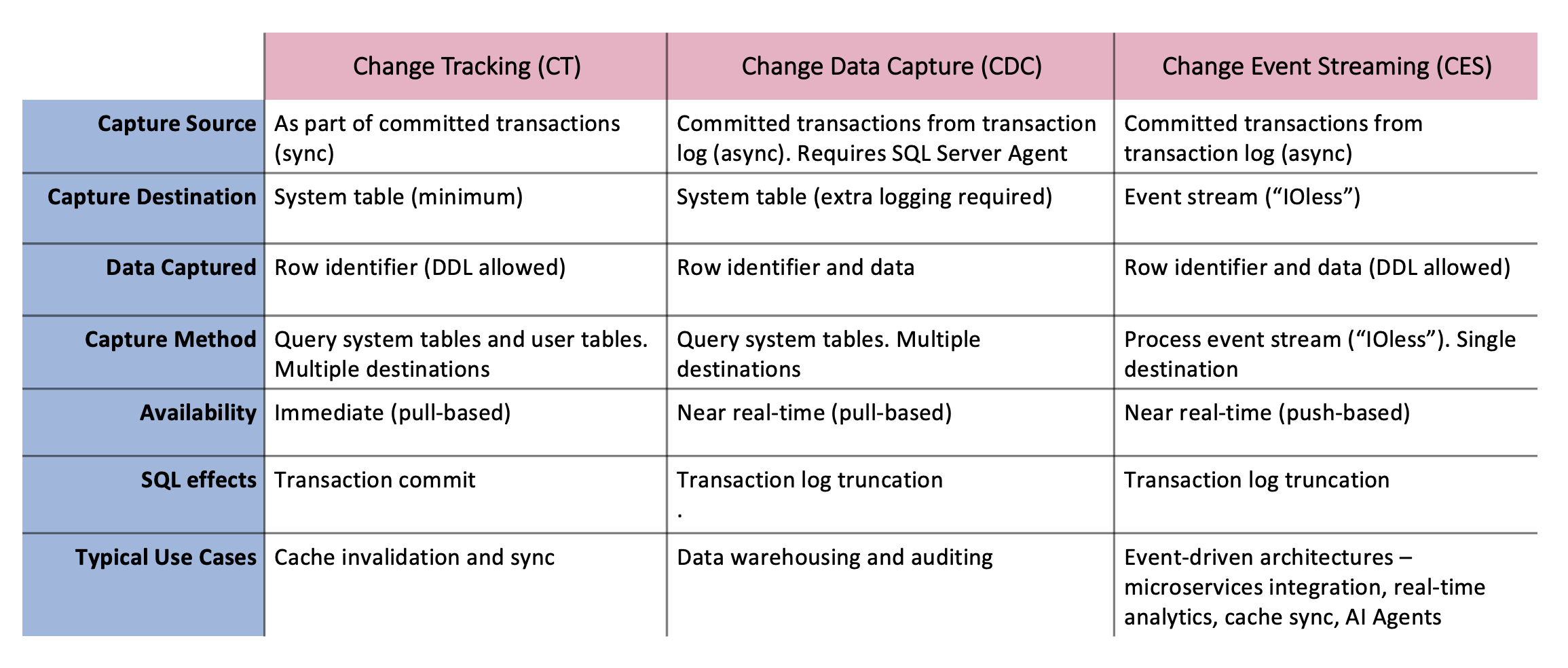
Here are differences between change tracking (CT), Change Data Capture (CDC) and Change Event Streaming (CES):
Configure your SQL Server 2025
We will need to:
– a login in the db_owner role or that has CONTROL_DATABASE permission for the database where you intend to enable CES,
– enable the preview feature database scoped configuration,
– prepare Powershell modules for working with Azure and Azure eventhubs (Az, Az.EventHub)
Run the Powershell scripts for installation:
Install-Module -Name Az -AllowClobber -Scope CurrentUser -Repository PSGallery -Force
Install-Module -Name Az.EventHub -Scope CurrentUser -Force
We will need to create a SAS token for authorization and connection to Azure. Replace must be the ResourceName, Namespace, Eventhub, PolicyName, and SubscriptionID.
function Generate-SasToken {
$subscriptionId = "<Azure-Subscription-ID>"
$resourceGroupName = "<Resource-group-name>"
$namespaceName = "<Azure-Event-Hub-Namespace-name>"
$eventHubName = "<Azure-Event-Hubs-instance-name>"
$policyName = "<Policy-name>"
$tokenExpireInDays = "<number-of-days-token-will-be-valid>"

# Modifying the rest of the script is not necessary.

# Login to Azure and set Azure Subscription.
Connect-AzAccount

# Get current context and check subscription
$currentContext = Get-AzContext
if ($currentContext.Subscription.Id -ne $subscriptionId) {
    Write-Host "Current subscription is $($currentContext.Subscription.Id), switching to $subscriptionId..."
    Set-AzContext -SubscriptionId $subscriptionId | Out-Null
} else {
    Write-Host "Already using subscription $subscriptionId."
}

# Try to get the authorization policy (it should have Send rights)
$rights = @("Send")
$policy = Get-AzEventHubAuthorizationRule -ResourceGroupName $resourceGroupName -NamespaceName $namespaceName -EventHubName $eventHubName -AuthorizationRuleName $policyName -ErrorAction SilentlyContinue

# If the policy does not exist, create it
if (-not $policy) {
    Write-Output "Policy '$policyName' does not exist. Creating it now..."

# Create a new policy with the Manage, Send and Listen rights
    $policy = New-AzEventHubAuthorizationRule -ResourceGroupName $resourceGroupName -NamespaceName $namespaceName -EventHubName $eventHubName -AuthorizationRuleName $policyName -Rights $rights
    if (-not $policy) {
        throw "Error. Policy was not created."
    }
    Write-Output "Policy '$policyName' created successfully."
} else {
    Write-Output "Policy '$policyName' already exists."
}

if ("Send" -in $policy.Rights) {
    Write-Host "Authorization rule has required right: Send."
} else {
    throw "Authorization rule is missing Send right."
}

$keys = Get-AzEventHubKey -ResourceGroupName $resourceGroupName -NamespaceName $namespaceName -EventHubName $eventHubName -AuthorizationRuleName $policyName

if (-not $keys) {
    throw "Could not obtain Azure Event Hub Key. Script failed and will end now."
}
if (-not $keys.PrimaryKey) {
    throw "Could not obtain Primary Key. Script failed and will end now."
}

# Get the Primary Key of the Shared Access Policy
$primaryKey = ($keys.PrimaryKey)
Write-Host $primaryKey

## Check that the primary key is not empty.

# Define a function to create a SAS token (similar to the C# code provided)
function Create-SasToken {
    param (
        [string]$resourceUri, [string]$keyName, [string]$key
    )

$sinceEpoch = [datetime]::UtcNow - [datetime]"1970-01-01"
    $expiry = [int]$sinceEpoch.TotalSeconds + ((60 * 60 * 24) * [int]$tokenExpireInDays) # seconds since Unix epoch
    $stringToSign = [System.Web.HttpUtility]::UrlEncode($resourceUri) + "`n" + $expiry
    $hmac = New-Object System.Security.Cryptography.HMACSHA256
    $hmac.Key = [Text.Encoding]::UTF8.GetBytes($key)
    $signature = [Convert]::ToBase64String($hmac.ComputeHash([Text.Encoding]::UTF8.GetBytes($stringToSign)))
    $sasToken = "SharedAccessSignature sr=$([System.Web.HttpUtility]::UrlEncode($resourceUri))&sig=$([System.Web.HttpUtility]::UrlEncode($signature))&se=$expiry&skn=$keyName"
    return $sasToken
}

# Construct the resource URI for the SAS token
$resourceUri = "https://$namespaceName.servicebus.windows.net/$eventHubName"

# Generate the SAS token using the primary key from the new policy
$sasToken = Create-SasToken -resourceUri $resourceUri -keyName $policyName -key $primaryKey

# Output the SAS token
Write-Output @"
-- Generated SAS Token --
$sasToken
-- End of generated SAS Token --
"@
}

Generate-SasToken
Available on Microsoft learn website.
With a SAS token available, we will configure the SQL Server:
USE db_20_CES;
GO

-- Create the Master Key with a password.
CREATE MASTER KEY ENCRYPTION BY PASSWORD = '<Password>';

CREATE DATABASE SCOPED CREDENTIAL <CredentialName>
    WITH IDENTITY = 'SHARED ACCESS SIGNATURE',
    SECRET = 'xxxxxxxxxxxx' -- Be sure to copy the entire token. The SAS token starts with "SharedAccessSignature sr="

EXEC sys.sp_enable_event_stream

EXEC sys.sp_create_event_stream_group
    @stream_group_name =      N'<EventStreamGroupName>',
    @destination_type =       N'AzureEventHubsAmqp',
    @destination_location =   N'<AzureEventHubsHostName>/<EventHubsInstance>',
    @destination_credential = <CredentialName>,
    @max_message_size_kb =    <MaxMessageSize>,
    @partition_key_scheme =   N'<PartitionKeyScheme>'

EXEC sys.sp_add_object_to_event_stream_group
    N'<EventStreamGroupName>',
    N'<SchemaName>.<TableName>'
Tomorrow we will continue to explore Change event streaming and setup everything in Azure .
As always, the code is available at my Github: https://github.com/tomaztk/SQLServer2025
Happy coding!


 TomazTsql
[…] Dec 20: Microsoft SQL Server 2025 – Change Event Streaming […]
LikeLike
[…] Tomaz Kastrun continues an advent of SQL Server 2025. Day 20 takes a look at change event streaming: […]
LikeLike
[…] Dec 20: Microsoft SQL Server 2025 – Change Event Streaming […]
LikeLike
[…] Dec 20: Microsoft SQL Server 2025 – Change Event Streaming […]
LikeLike
[…] Dec 20: Microsoft SQL Server 2025 – Change Event Streaming […]
LikeLike