## Thanks to the UCI repository Magic Gamma telescope data set
magic04 = read.table("http://archive.ics.uci.edu/ml/machine-learning-databases/magic/magic04.data", header = F, sep=",")
# split the data set in test and training set
split.data <- function(data, p = 0.7, s = 666){
  set.seed(s)
  index <- sample(1:dim(data)[1])
  train <- data[index[1:floor(dim(data)[1] * p)], ]
  test <- data[index[((ceiling(dim(data)[1] * p)) + 1):dim(data)[1]], ]
  return(list(train = train, test = test))
  }
dati = split.data(magic04, p = 0.7)
train = dati$train
test = dati$test
# SVM training just for fun
library(e1071)
model <- svm(train[,1:10],train[,11], probability = T)
# prediction on the test set
pred <- predict(model, test[,1:(dim(test)[[2]]-1)], probability = T)
# Check the predictions
table(pred,test[,dim(test)[2]])
pred.prob <- attr(pred, "probabilities")
pred.to.roc <- pred.prob[, 1]
# performance assessment
library(ROCR)
pred.rocr <- prediction(pred.to.roc, as.factor(test[,(dim(test)[[2]])]))
perf.rocr <- performance(pred.rocr, measure = "auc", x.measure = "cutoff")
cat("AUC =",deparse(as.numeric(perf.rocr@y.values)),"\n")
perf.tpr.rocr <- performance(pred.rocr, "tpr","fpr")
plot(perf.tpr.rocr, colorize=T)
mercoledì 27 febbraio 2008
Classification: a quick and dirty example


giovedì 10 gennaio 2008
Hello World for Clustering methods
A hello world program can be a useful sanity test to make sure that the procedure/methods you are analyzing "works" at least for very basic tasks. For this purpose, I create an artificial data set from 4 different 2-dimensional normal distributions to check how well the 4 clusters can be recognized by common clustering methods.

set1 <- matrix(cbind(rnorm(100,0,2),rnorm(100,0,2)),100,2)
set2 <- matrix(cbind(rnorm(100,0,2),rnorm(100,8,2)),100,2)
set3 <- matrix(cbind(rnorm(100,8,2),rnorm(100,0,2)),100,2)
set4 <- matrix(cbind(rnorm(100,8,2),rnorm(100,8,2)),100,2)
dati <- list(values=rbind(set1,set2,set3,set4),classes=c(rep(1,100),rep(2,100),rep(3,100),rep(4,100))) # clustering - common methods
op <- par(mfcol = c(2, 2))
par(las =1)
plot(dati$values, col = as.integer(dati$classes), xlim=c(-6,14), ylim = c(-6,14), xlab="", ylab="", main = "True Groups")
party <- kmeans(dati$values,4)
plot(dati$values, col = party$cluster,  xlab = "", ylab = "", main = "kmeans")
hc = hclust(dist(dati$values), method = "ward")
memb <- cutree(hc, k = 4)
plot(dati$values, col = memb, xlab = "", ylab = "", main = "hclust Euclidean ward") hc = hclust(dist(dati$values), method = "complete")
memb <- cutree(hc, k = 4)
plot(dati$values, col = memb, xlab = "", ylab = "", main = "hclust Euclidean complete")
par(op)

lunedì 26 novembre 2007
martedì 16 ottobre 2007
Duplicate a figure with R
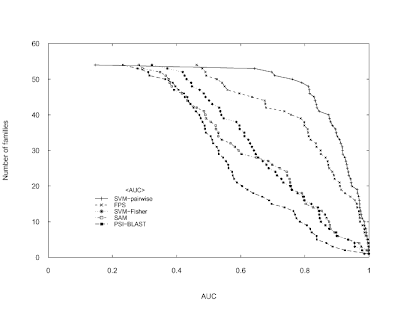
The following code attempts to reproduce the Figure 3 (top) in Liao L, Noble WS.
Combining pairwise sequence similarity and support vector machines for detecting remote protein evolutionary and structural relationships. Journal of computational biology. 2003;10(6):857-68 using only the Base graphics system in R.
Data can be downloaded from here (if it doesn't work, use Google's cache).
I imported the file in a spreadsheet and then I copied & pasted it in R.
The original image:

My version of the image (not exacly identical but...):
Combining pairwise sequence similarity and support vector machines for detecting remote protein evolutionary and structural relationships. Journal of computational biology. 2003;10(6):857-68 using only the Base graphics system in R.
Data can be downloaded from here (if it doesn't work, use Google's cache).
I imported the file in a spreadsheet and then I copied & pasted it in R.
jcb.scores = read.delim("clipboard")
attach(jcb.scores)
pdf("recomb_scores.pdf")
par(las =1) # To have horizontal labels for axes 2 and 4
plot(y~sort(SVM.pairwise.ROC, decreasing = TRUE), pch = 3, cex = 0.5,
xlab = "AUC", ylab = "Number of families", axes = FALSE,
xlim = c(0,1), ylim = c(0,60))
lines(y~sort(SVM.pairwise.ROC, decreasing = TRUE), lty = 1)
points(y~sort(FPS.ROC, decreasing = TRUE), pch = 4, cex = 0.5)
lines(y~sort(FPS.ROC, decreasing = TRUE), lty = 2)
points(y~sort(SVM.Fisher.ROC, decreasing = TRUE), pch = 8, cex = 0.5)
lines(y~sort(SVM.Fisher.ROC, decreasing = TRUE), lty = 3)
points(y~sort(SAM.ROC, decreasing = TRUE), pch = 0, cex = 0.5)
lines(y~sort(SAM.ROC, decreasing = TRUE), lty = 4)
points(y~sort(PSI.BLAST.ROC, decreasing = TRUE), pch = 15, cex = 0.5)
lines(y~sort(PSI.BLAST.ROC, decreasing = TRUE), lty = 5)
axis(1, at = seq(0,1,0.2), labels = c(0,0.2,0.4,0.6,0.8,1), tcl = 0.25, pos = 0) # tcl = 0.25 small ticks toward the curve
axis(2, at = c(0,10,20,30,40,50,60), labels=c(0,10,20,30,40,50,60), tcl= 0.25 , pos = 0)
axis(2, at = c(0,10,20,30,40,60), tcl= 0.25,labels = F, pos = 0)
axis(3, tick = T, tcl= 0.25, labels = F, pos = 60)
axis(4, at = c(0,10,20,30,40,50), tcl= 0.25, labels = F, pos = 1)
axis(4, at = c(0,10,20,30,40,60), tcl= 0.25, labels = F, pos = 1)
# To locate the legend interactively
xy.legend = locator(1)
# right-justifying a set of labels: thanks to Uwe Ligges
temp <- legend(xy.legend, legend = c("SVM-pairwise", "FPS","SVM-Fisher", "SAM","PSI-BLAST"), text.width = strwidth("SVM-pairwise"), xjust = 1, yjust = 1, lty = c(1,2,3,4,5), pch = c(3,4,8,0,15), bty = "n", cex = 0.8, title = "")
dev.off()
detach(jcb.scores)
The original image:

My version of the image (not exacly identical but...):

venerdì 14 settembre 2007
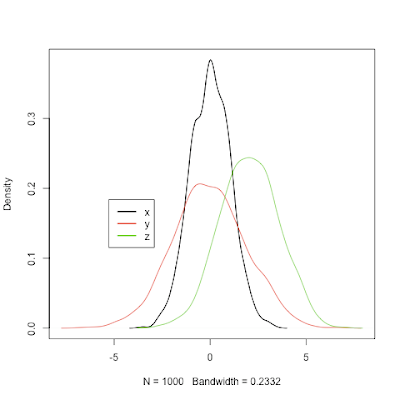
Plotting two or more overlapping density plots on the same graph
This post was updated.
See this thread from StackOverflow for other ways to solve this task.
See this thread from StackOverflow for other ways to solve this task.
plot.multi.dens <- function(s)

{

junk.x = NULL

junk.y = NULL

for(i in 1:length(s))

{

junk.x = c(junk.x, density(s[[i]])$x)

junk.y = c(junk.y, density(s[[i]])$y)

}

xr <- range(junk.x)

yr <- range(junk.y)

plot(density(s[[1]]), xlim = xr, ylim = yr, main = "")

for(i in 1:length(s))

{

lines(density(s[[i]]), xlim = xr, ylim = yr, col = i)

}

}

#usage:

x = rnorm(1000,0,1)

y = rnorm(1000,0,2)

z = rnorm(1000,2,1.5)

# the input of the following function MUST be a numeric list

plot.multi.dens(list(x,y,z))

library(Hmisc)

le <- largest.empty(x,y,.1,.1)

legend(le,legend=c("x","y","z"), col=(1:3), lwd=2, lty = 1)
giovedì 9 agosto 2007
R package installation and administration
A short list of basic but useful commands for managing
the packages in R:
the packages in R:
# install a package
install.packages("ROCR")
# visualize package version
package_version("pamr")
# update a package
update.packages("Cairo")
# remove a package
remove.packages("RGtk2")venerdì 3 agosto 2007
Sorting/ordering a data.frame according specific columns
x = rnorm(20)
y = sample(rep(1:2, each = 10))
z = sample(rep(1:4, 5))

data.df <- data.frame(values = x, labels.1 = y, labels.2 = z)
print(data.df)

# data ordered according to "labels.1" column
# and then "labels.2" column
nams <- c("labels.1", "labels.2")
data.df.sorted = data.df[do.call(order, data.df[nams]), ]
print(data.df.sorted)
Iscriviti a:
Commenti (Atom)